

Shinsa application is currently sent out as an Excel file, with a requirement to fill the entire on a computer. The file is adjusted to the Japanese writing system, therefore, there are often hidden fields one must take into the account. It’s important not to enlarge the fields to fit any text, as the application file is fitting on one A4 page. Here is a guide how to fill out the file (Windows Excel version):
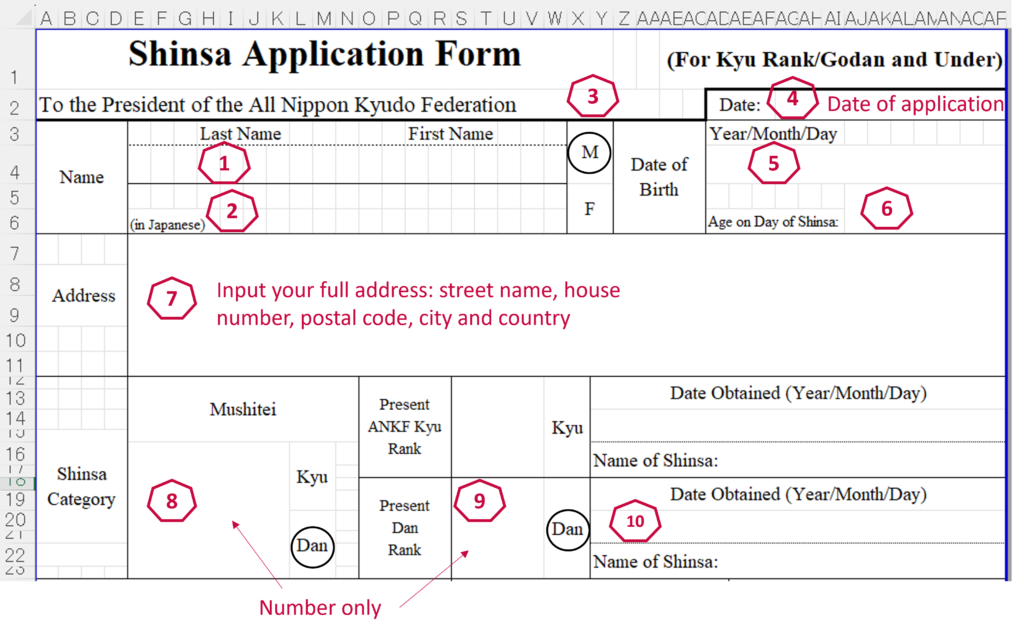
- Write your last and first name with Latin alphabet. Here you can merge the cells to fit your name and surname.
- If you don’t know, how to write your name in Japanese, you can leave these fields blank. The recipients of the application will translate your name in accordance with Japanese sounds. You can also ask your Japanese-speaking senpai to help you with the name, so it’s as close to the initial pronunciation, as possible.
- Insert a circle over your gender. You can use “Insert” > “Shapes” function in Excel.
- Write the date you filled the application. If you need to change the format of the date, right-click on the field, select “Format Cells”. From the menu, choose “Date”, change Calendar type to “Japanese” and select the same format, as required in the form – Year/Month/Day.
- Date of birth.
- Your age at the time you’ll be taking the shinsa.
- Full address with Latin letters.
- Write the grade you are going for as a number. Circle “Dan” the same way, as in point No. 3.
- Your current grade, as a number. If you don’t have a grade, you can write “0” in this field.
- If you have passed a grade before, write the name of the shinsa and date taken. Name of the shinsa you can find in the previous invitation or application.
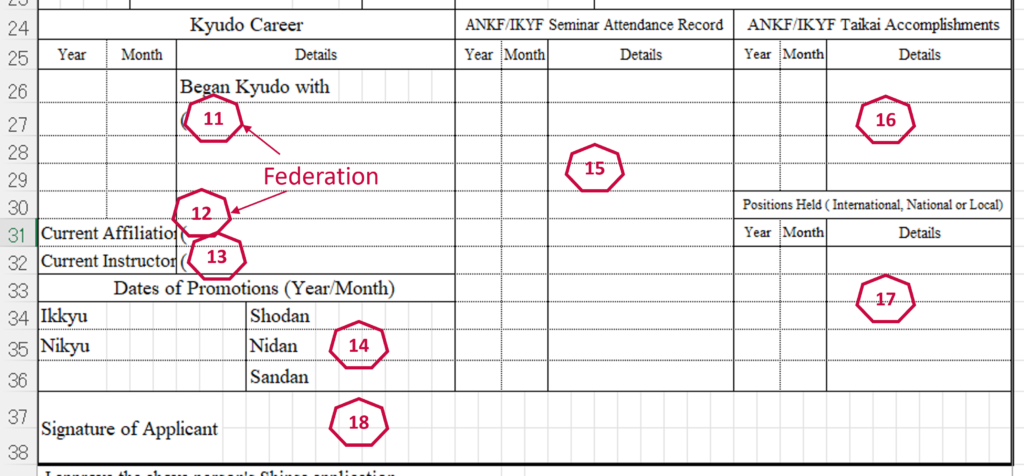
- Write Federation (or a club – if you haven’t been a member) in the field. There are hidden cells in this field, merge them.
- Your current federation. Cells need to be merged, too.
- Name of your official instructor. It could be the leader of the federation, your official trainer of the club, or someone outside of the club, who has taken responsibility for your progress.
- Write dates you have passed your previous grades. If you have no previous grades, leave these fields blank.
- Fill out the dates and names of ANKF/IKYF seminars you have attended. Local seminars in Denmark and neighboring countries are not included. These have to be large international seminars, arranged by above organisations,
- If you have participated in any international competitions, not arranged by local associations, fill names and dates here,
- If you hold any position within local association/federation, fill out the fields.
- Signature is the last thing that needs to be filled out. Once you’re done with the next section, save file as PDF (F.x. via command “File” > “Print” > “Microsoft print to PDF”) and open in any PDF editor to use signature function on a touchscreen. As an example, file could be saved to Google Drive, and signed there.
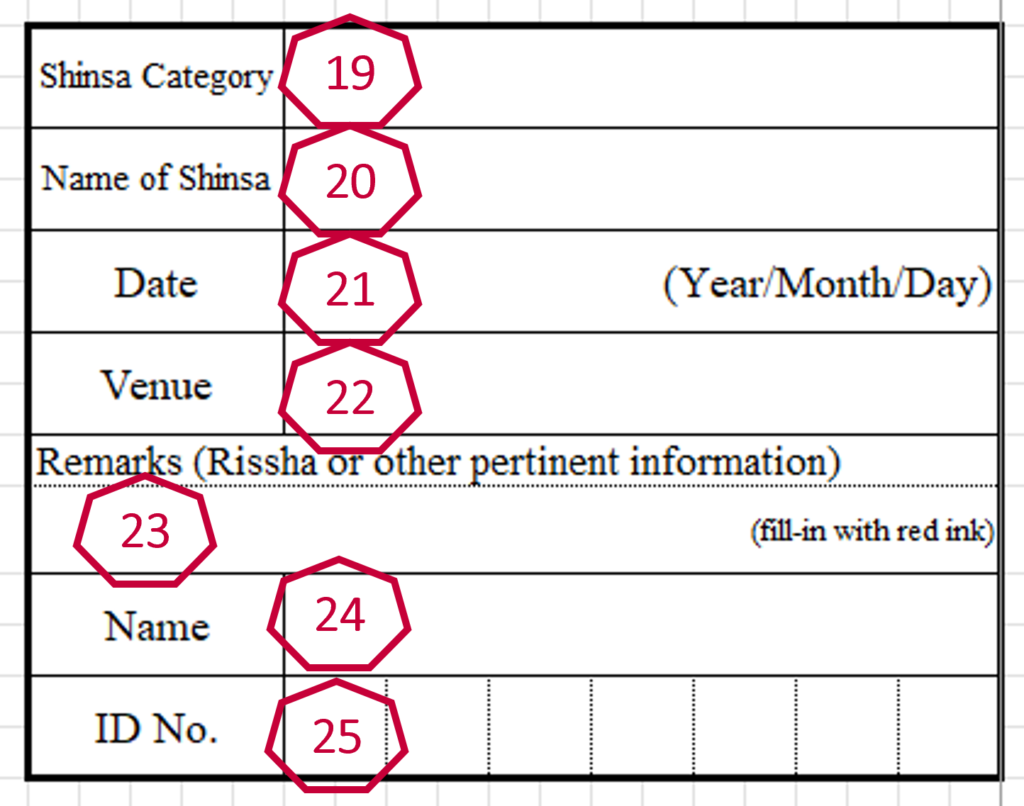
- Category is a full name of your grade: Shodan, Nidan, Sandan, etc.
- Name of shinsa is usually written on the invitation.
- Date when shinsa is arranged.
- Venue of the shinsa. In case of video shinsa, write the city where it’s going to be filmed.
- If you are doing the taihai standing, then write Rissha in red.
- Your surname and name.
- Your ID number. You will usually receive it after first shinsa, so if it’s the firs one, you’re taking, leave the field blank.
When you’ve signed the application, send it further to the leader of the federation, as they need to sign it. If you have any further questions – reach out to your local trainer to help you with application.

Skriv et svar